

How to Create a Profile Editing Form
When you are making a registration form, you get two shortcodes:
- For embedding the registration form: this is something like
[wpuf_profile type="registration" id="3573"] - For the profile edit page: this is something like
[wpuf_profile type="profile" id="3573"]
You already know how to make a registration form in WP User Frontend Pro and embed that into a page. The very same process is used for creating the profile edit page.
How to Get the Shortcode
Section titled “How to Get the Shortcode”I assume that you have already created a registration form. If not, you can use the default registration form, which was created automatically while installing the plugin.
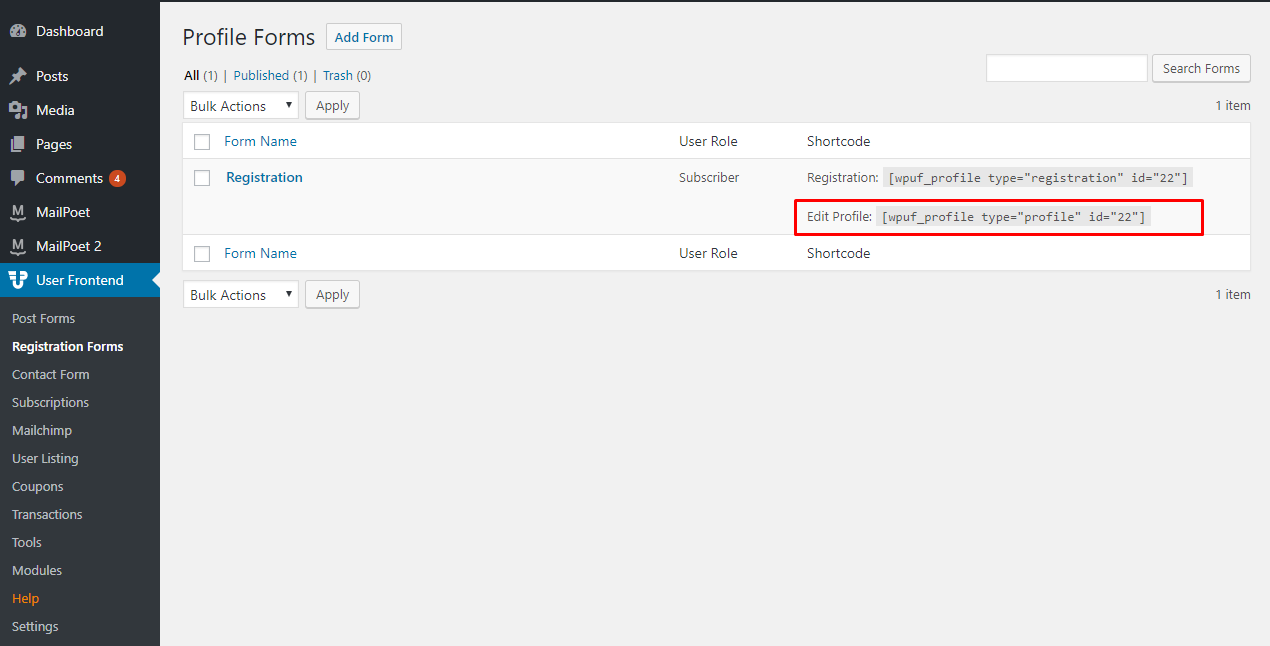
So to get the shortcode, navigate to WP-Admin > User Frontend > Registration Forms, and you will be able to see the shortcodes on the right side of your screen.
How to Use the Shortcode
Section titled “How to Use the Shortcode”Now you just have to copy and paste that shortcode into a page. When a user clicks the link to that page, that means visiting the page will show the fields with the data the user entered earlier.
That's it! Let us know in our forums if you need any more detailed information.