Your members submit posts, edit them later, check payments, and update their profile on a page you control, and two shortcodes put the whole thing there.
Run a Dashboard Members Actually Use
Six things change the day you hand people their own page instead of a login.
Skip the Backend
People post and edit without one trip into wp-admin.
Live in Minutes
Install WPUF Pages builds the page and drops the shortcode in for you.
Fewer Support Emails
Writers see their own drafts and pending posts, so they stop asking you.
Any Post Type
Point a dashboard at events, listings, or products instead of blog posts.
Payments in Plain View
Paid posts carry a payment column, which is switched on by default.
Works in Elementor
Three free widgets cover the account, subscription, and post form pages.
See What Sits Inside the Dashboard
Posts, profile, subscription, and billing all run from two shortcodes.
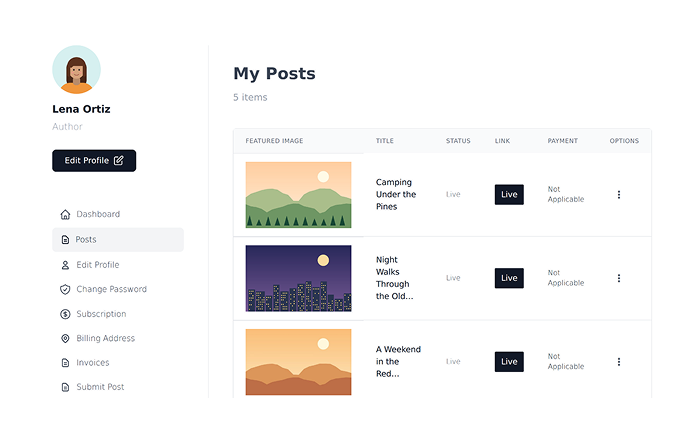
Post Dashboard
[wpuf_dashboard]lists the posts a user sent in and links each one to the edit page.Account Tabs
[wpuf_account]opens Edit Profile, Change Password, Subscription, and Billing Address tabs.Status Filters
Draft, pending, future, publish, and private posts all appear by default.
Control Every Column from the Shortcode
The shortcode takes attributes for the featured image, excerpt, custom meta, category, and payment column. The post_status attribute sets which posts show up.
Build One Dashboard per Post Type
One attribute sets which post type a page lists, so add as many as your site needs.
Post Type Targeting
Add
post_type="event"and the page lists events, not posts.Display Attributes
Attributes cover the featured image, excerpt, custom meta, and category.
Status Filtering
Show published work only, or include drafts, pending, and scheduled posts.
Payment Column
The payment column is on by default, and one attribute removes it.
Edit Link Built In
Every row links to the Edit page, so authors fix their own posts.
No Theme Edits
Every option is a shortcode attribute, so no template file changes.
See Who Runs a Frontend Dashboard
Four setups where a user page takes work off your desk.
Frequently Asked Questions
The questions support hears most often about the frontend dashboard.
Does the dashboard work in the free version?
[wpuf_dashboard], [wpuf_account], and the Edit page, so the whole flow works before you pay anything. Pro then adds the full profile builder, avatar and cover photo uploads, and unlimited custom fields.Can users edit or delete their own posts?
Can one site show several dashboards?
[wpuf_dashboard post_type="event"] lists events instead of posts. Then put each dashboard on its own page so the two groups never see each other's work.Which tabs appear on the account page?
Can people upload an avatar or cover photo?
Do members see their plan and payments?
[wpuf_sub_info] on any other page.Can I build these pages with Elementor?
[wpuf_dashboard] shortcode, which sits inside any Elementor layout.Does any of this need coding?
Build Your User Dashboard with WP User Frontend
Install the free plugin, and your dashboard page is ready in minutes.